
The smartest survey design software
No coding skills required
Survey design software plays a pivotal role in simplifying the process of creating questionnaires, and IdSurvey is an exceptional example of such software. With IdSurvey, anyone, regardless of their programming skills, can effortlessly design questionnaires that align with their specific needs. Its user-friendly interface is accessible via any web browser, making it both convenient and efficient.
With a wide range of question types and advanced survey design tools like IdCode, IdSurvey allows professionals to build even the most complex questionnaires with ease.
The software streamlines the survey design process, ensuring that users can create fully customized, professional-looking surveys quickly and effortlessly. The intuitive interface and comprehensive features of IdSurvey make it a preferred choice among professionals.
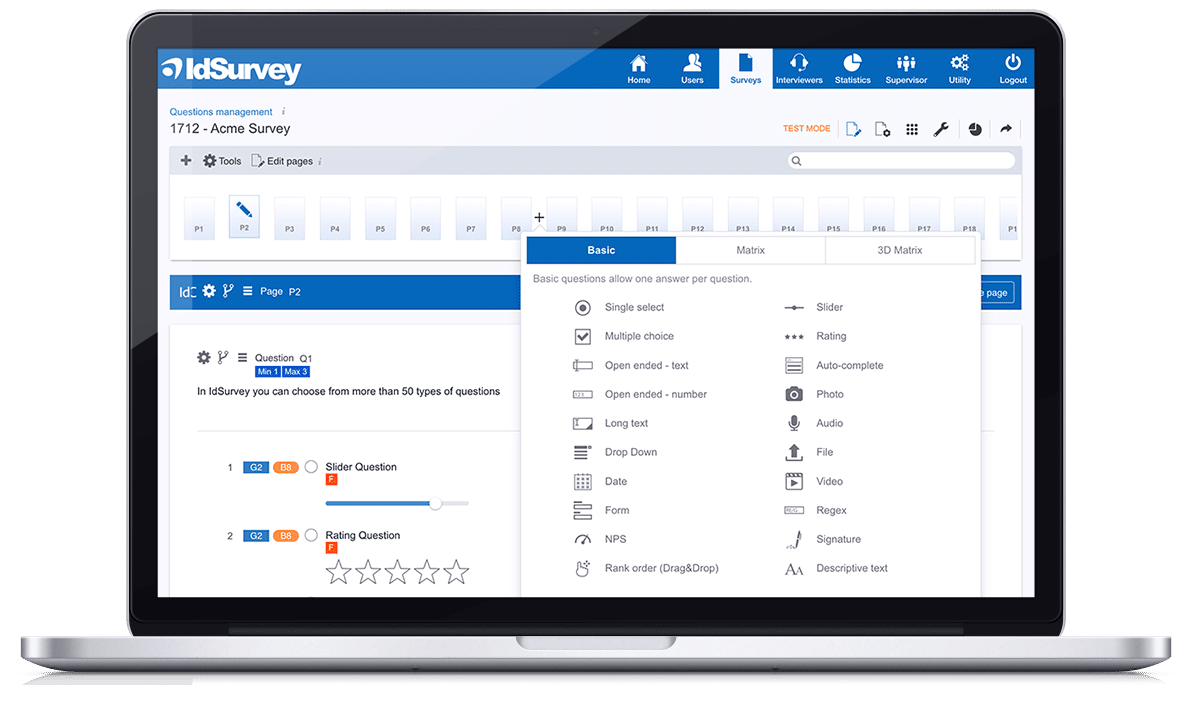
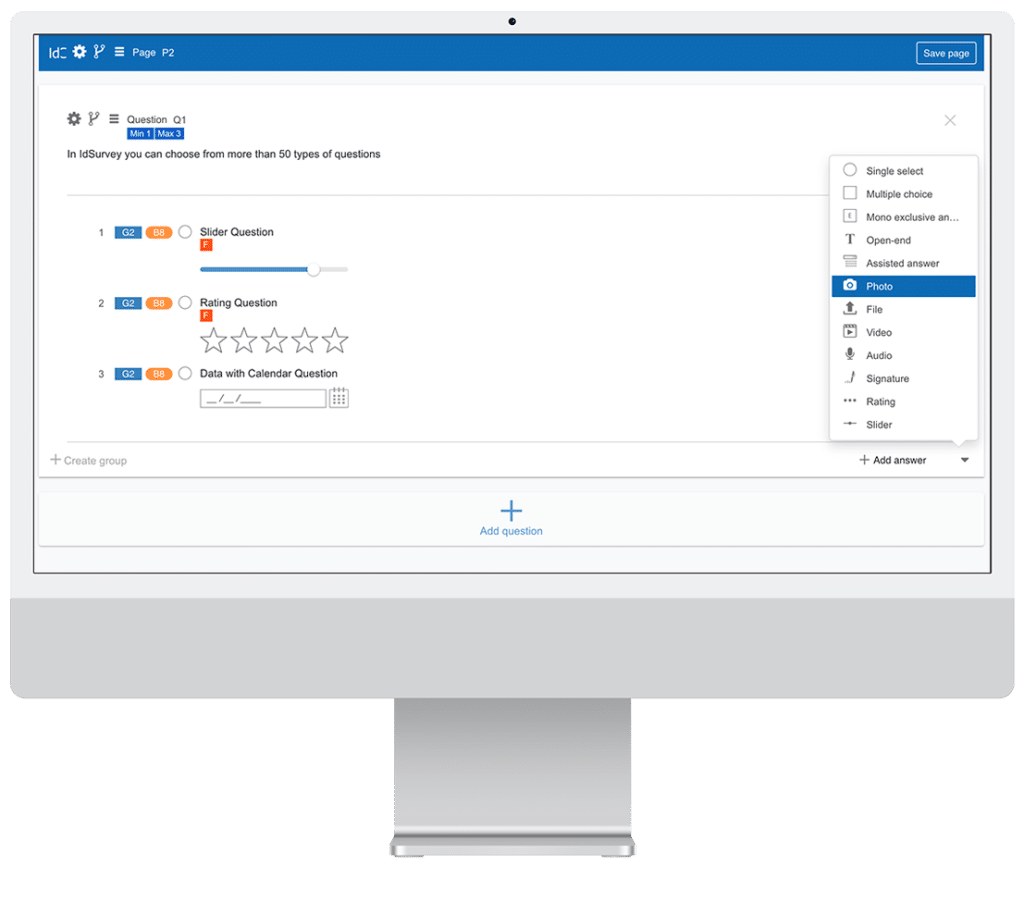
Survey design tools integrated into an intuitive interface
Everything at Your Fingertips
IdSurvey provides a versatile platform to create questionnaires for various survey modes, including telephone (CATI), online (CAWI), and face-to-face (CAPI) interviews. This flexibility allows users to adapt their surveys to different projects, ensuring seamless integration with their preferred surveying approach. With a simple and intuitive interface, IdSurvey empowers users to efficiently configure the questionnaire according to their requirements, saving time and effort. The survey design software provides a visual representation of the questionnaire (WYSIWYG) that provides a real-time visual representation of the questionnaire, offering a clear overview of how it will appear to respondents. With just a few clicks, users can add or edit texts, select survey questions, and incorporate complex rules. IdSurvey’s streamlined survey design process empowers users to efficiently create questionnaires without extensive technical knowledge.
Create unlimited survey questions with top-notch survey design software
Endless combinations, brilliant solutions
Design highly engaging surveys with IdSurvey’s diverse question formats, including rating scales, sliders, drag-and-drop ranking and all the other question types. Improve response rates by incorporating interactive elements like images, video, audio, and file uploads. Choose from standard, matrix, and 3D matrix questions to tailor surveys to your needs.

Single select
Select one only answer (Radio button)
Multiple choice
Select one or more answers (Checkbox).
Text
Insert short text answer (Input field)
Number
Insert whole or decimal numbers
Textarea
Insert answer longer than a sentence
Drop-down
Select one answer from the drop-down
Date
Select a date with the calendar
Slider
Move the pointer and pick a value
Comparative slider
Pick what and how much you prefer
Rating
Collect answers based on a rating
Like
Express a preference with like
Smile
Collect feedback in a fun way
Drag & Drop Ranking
Drag answers in a ranking
Autocomplete
Start typing and select your answer
Photo
Take a live photo also from the browser or upload an existing one
Upload file
Upload any type of file
Descriptive text
Insert customized text
Video
Record live videos from the browser or upload an existing one
Audio
Record live audio from the browser or upload an existing one
Regex
Use any regular expression
Exclusive
If selected, it disables all other options
GPS
Save CAPI device location
Matrix
Use matrix questions with your preferred options
3D Matrix
Insert more answers in a single cell
Buttons
Show answer options as buttons
Carousel
Show questions inside a carouse
MaxDiff
Select the worst and best attribute
Signature
Ask for a signature during the interview
Single select
Select one only answer (Radio button)
Textarea
Insert answer longer than a sentence
Comparative slider
Pick what and how much you prefer
Drag & Drop Ranking
Drag answers in a ranking
Descriptive text
Insert customized text
Exclusive
If selected, it disables all other options
Buttons
Show answer options as buttons
Multiple choice
Select one or more answers (Checkbox).
Drop-down
Select one answer from the drop-down
Rating
Collect answers based on a rating
Autocomplete
Start typing and select your answer
Video
Record live videos from the browser or upload an existing one
GPS
Save CAPI device location
Carousel
Show questions inside a carouse
Text
Insert short text answer (Input field)
Date
Select a date with the calendar
Like
Express a preference with like
Photo
Take a live photo also from the browser or upload an existing one
Audio
Record live audio from the browser or upload an existing one
Matrix
Use matrix questions with your preferred options
MaxDiff
Select the worst and best attribute
Number
Insert whole or decimal numbers
Slider
Move the pointer and pick a value
Smile
Collect feedback in a fun way
Upload file
Upload any type of file
Regex
Use any regular expression
3D Matrix
Insert more answers in a single cell
Signature
Ask for a signature during the interview
Survey design software: logic and branching
Advanced Survey Logic for Maximum Flexibility

Complete control, endless possibilities
With the survey design software, you can specify parameters and settings for each questionnaire element, giving you maximum control through a comprehensive suite of survey design tools.
Display
Collect quality data: decide if to display it according to previous answers or respondent’s personal information.
Skip
Manage interview-flow settings with simple or complex skip logic.
Piping
Use text piping to display an answer or data or use it to design your logic conditions.
Quota
Set quotas for any respondent’s characteristics, and collect only the interviews you need.
Random
Display answers, questions, or pages in random order using IdSurvey's powerful random engine.
Script
Customize the verifications, graphics, and functions of any questionnaire item by using ClientScript and its endless options.
Tools for complete control.
Restrictions
Insert any type of rule to validate text or numerical answers
Answer limit
Set minimum and maximum answers for a question
Update contact
Automatically update a contact field according to one or more answers
Out of target
Set the out of target in answers that determine the screen out
Autocorrect
An answer can edit the value of a previous one
Client Script
Set CSS style of JavaScript code within a page
Alert
Add alerts on questions with a customized text
Show or Hide
Display a question or answer just in specific conditions
Loop
Create all kinds of loops, static or dynamic to repeat sections of the questionnaire.
Encode questions
Encode or assign a score to answers setting all kinds of rules.
Unlimited conditions
Create rules of any complexity with logic conditions and functions.
Optional answer
Decide if the question has a mandatory or optional answer
Not sequential
The page is displayed only if directly called by a skip condition
More questions in a page
Insert more questions in a page to make questionnaire compiling faster
Logic control
Check display conditions and skip syntax.
Easy integrations
Add variables in the interview URL to easily integrate IdSurvey with third-party tools.
Restrictions
Insert any type of rule to validate text or numerical answers
Autocorrect
An answer can edit the value of a previous one
Loop
Create all kinds of loops, static or dynamic to repeat sections of the questionnaire.
Not sequential
The page is displayed only if directly called by a skip condition
Answer limit
Set minimum and maximum answers for a question
Client Script
Set CSS style of JavaScript code within a page
Encode questions
Encode or assign a score to answers setting all kinds of rules.
More questions in a page
Insert more questions in a page to make questionnaire compiling faster
Update contact
Automatically update a contact field according to one or more answers
Alert
Add alerts on questions with a customized text
Unlimited conditions
Create rules of any complexity with logic conditions and functions.
Logic control
Check display conditions and skip syntax.
Out of target
Set the out of target in answers that determine the screen out
Show or Hide
Display a question or answer just in specific conditions
Optional answer
Decide if the question has a mandatory or optional answer
Easy integrations
Add variables in the interview URL to easily integrate IdSurvey with third-party tools.

Survey design software: random
Random doesn’t mean chaos

Survey design software powered by IdCode
All the capabilities of coding, no programming required
Easily build multilingual questionnaires using survey design software
Ask good questions in the right language
Effortlessly create multilingual surveys by importing translation files in the survey design software. IdSurvey automatically detects the respondent’s browser language and displays the questionnaire accordingly. Use language settings to modify question flow or visibility, ensuring a tailored survey experience for diverse audiences. Improve the quality of your survey research allowing the respondents to answer the survey in the language they prefer.

Features
Language identification
IdSurvey will automatically display the questionnaire according to the browser language of the contact.
Default language
Choose the survey language used by IdSurvey by default if the user’s language is not in the translations available.
Language switch
The user can decide to change to his target language by clicking on the main menu of the questionnaire.
Pre-set language
Pre-set the user’s language in the “Language” field of the contact.
Export Excel
Export translation with Excel files and share them with your translators to improve your translation process.
Import Excel
Import translations with Excel files. You can import all the translations, a single language or the missing revisions only.
Excel columns identification
IdSurvey will identify the columns of the Excel file of your translators and automatically associate them to the corresponding language.
Identify missing translations
You can export and import only the parts of the questionnaire that have not been translated yet.
Manage editings
Export and import only the parts of the questionnaire that you need to revise if the main language was edited.
All the alphabets of the world
IdSurvey supports special alphabets, characters and languages such as Russian, Japanese, Chinese, etc to cover all target audience.
Language editing
You can edit translations from the Excel file or by using the IdCode of the questionnaire.
Logics
Customize the flow and the logics of the questionnaire according to the language used by the user.
Use one link only
Share a single survey link. IdSurvey will automatically display the questionnaire in the language of the respondent.
Available for any module
Not only CAWI. Create multilingual surveys also for CATI and CAPI. Distribute the contacts according to the languages spoken by the interviewers.
One db
Thanks to multilingual surveys you can collect, export and analyze data in one single questionnaire for accurate results.
Language identification
IdSurvey will automatically display the questionnaire according to the browser language of the contact.
Pre-set language
Pre-set the user’s language in the “Language” field of the contact.
Excel columns identification
IdSurvey will identify the columns of the Excel file of your translators and automatically associate them to the corresponding language.
All the alphabets of the world
IdSurvey supports special alphabets, characters and languages such as Russian, Japanese, Chinese, etc to cover all target audience.
Use one link only
Share a single survey link. IdSurvey will automatically display the questionnaire in the language of the respondent.
Default language
Choose the survey language used by IdSurvey by default if the user’s language is not in the translations available.
Export Excel
Export translation with Excel files and share them with your translators to improve your translation process.
Identify missing translations
You can export and import only the parts of the questionnaire that have not been translated yet.
Language editing
You can edit translations from the Excel file or by using the IdCode of the questionnaire.
Available for any module
Not only CAWI. Create multilingual surveys also for CATI and CAPI. Distribute the contacts according to the languages spoken by the interviewers.
Language switch
The user can decide to change to his target language by clicking on the main menu of the questionnaire.
Import Excel
Import translations with Excel files. You can import all the translations, a single language or the missing revisions only.
Manage editings
Export and import only the parts of the questionnaire that you need to revise if the main language was edited.
Logics
Customize the flow and the logics of the questionnaire according to the language used by the user.
One db
Thanks to multilingual surveys you can collect, export and analyze data in one single questionnaire for accurate results.
Survey design software with test mode to ensure accuracy
Testimonials





Survey design software: FAQ
What is survey design software?
Survey design software is a specialized tool that facilitates the creation and customization of questionnaires for surveys. It provides a user-friendly interface that allows users to design surveys according to their specific needs and research goals. Survey design software typically offers a wide range of question types, logic and branching capabilities, multilingual management, quotas management, and other advanced features to optimize the survey design process. It eliminates the need for programming skills, enabling users to easily create professional-looking surveys that capture the desired information from respondents. The most professional survey design tools cover multiple methodologies like telephone, online and offline.
What is survey design?
Survey design refers to the process of creating a questionnaire to gather data from a targeted group of respondents. It involves carefully crafting the structure, format, and content of the survey to ensure that it effectively captures the desired information. Survey design encompasses various aspects, including selecting appropriate question types, organizing the sequence of questions, implementing logical flow, and considering the overall survey experience for respondents. A well-designed survey is crucial for collecting accurate and reliable data that can be analyzed to gain useful insights about the target audience.
How to design a good survey with a survey design software?
Designing a good survey involves several key aspects to keep in mind:
- Clearly define the research goals and target audience to ensure the survey aligns with the desired outcomes.
- Craft concise and unbiased survey questions that are relevant to the objectives. Use a variety of question types to gather different types of data.
- Organize the survey in a logical and coherent flow, keeping it user-friendly and engaging.
- Incorporate proper response scales and offer an option for open-ended feedback.
- Pretest the survey with a small sample to identify and address any issues before administering it to the larger audience.
Knowledge base
Enter the knowledge base to discover all the solutions and strategies for setting up and designing questionnaires.
Guide and papers
IdSurvey has an online guide for all features of the software so you can easily discover all tools.
Help Desk support
Using your ticket area you can request technical assistance. One of our experts will answer you back shortly.